Doublegram Lookup

Find any Telegram ID
and see who's behind it

Send an @username, a t.me link or an ID, or forward a message: Lookup gives you the ID, tells you who it is and whether Telegram flags it as a scam. It works from any chat and in your groups too.

Telegram user search: by username, link, ID or forward

Send it what you have: Lookup works out what it is on its own and gives you the information you need.

Forwarded messages

Forward someone's message to Lookup and find out who they are.

For your group and your admins

Reply to a message with /lookup and find out who wrote it, even if they have no username. Only you see the answer. Works with Premium in the group.

Username, link or ID

From a username, a t.me link or an ID, see right away who's behind it: a person, a bot, a group or a channel.

In any chat

No need to open the bot: type @dglookbot and what you're looking for in any chat, and the answer shows up right there.

Find the Telegram ID or chat ID of people, groups and channels

The ID is the number that stays the same even when the username changes. Lookup gives it to you every time, ready to copy.
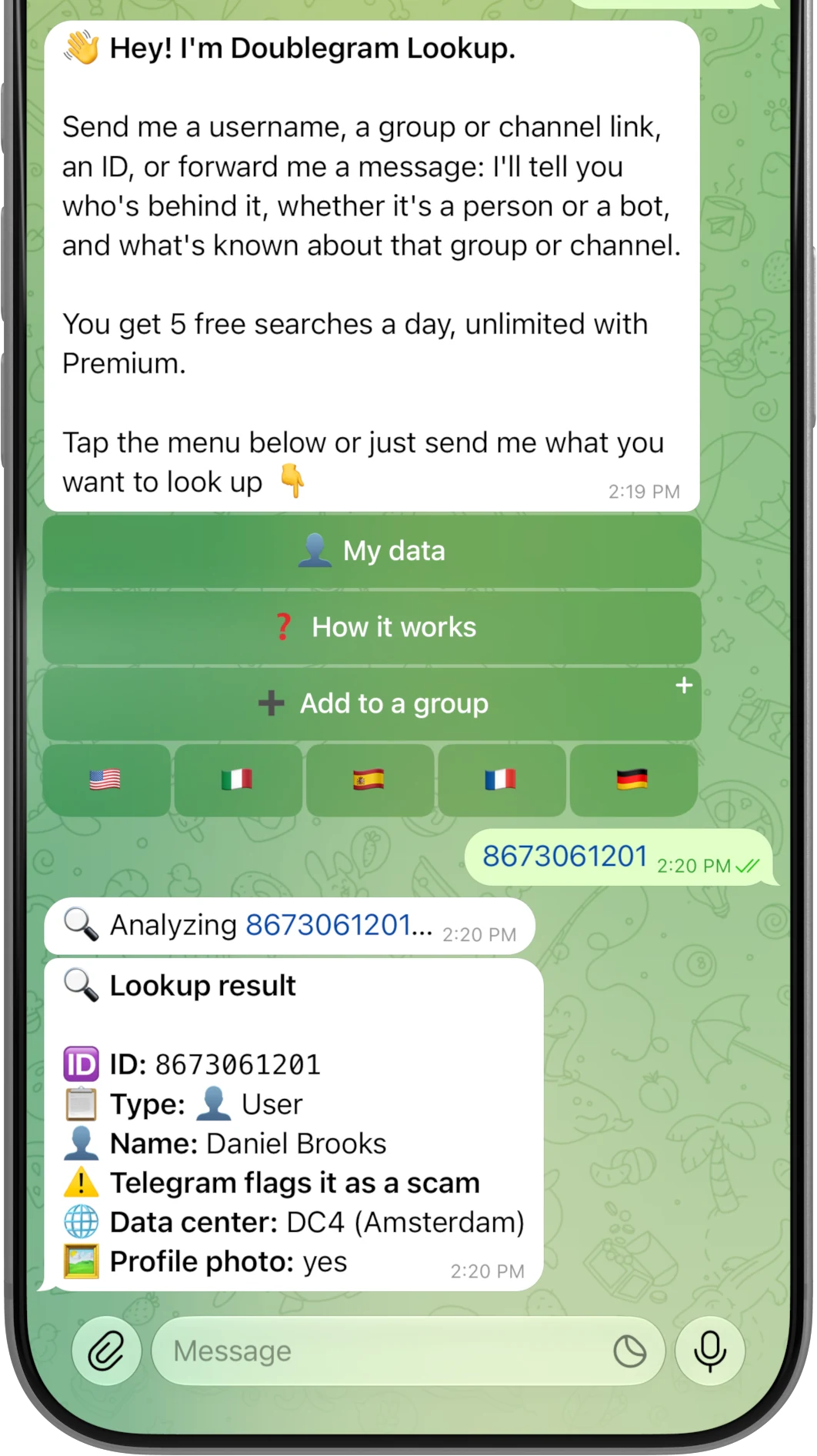
  • The chat ID of groups and channelsThe full one, starting with -100, the way bots and APIs ask for it.
  • Accounts flagged by TelegramIf Telegram has marked an account as a scam or as fake, it's the first thing you see.
For your groups

Telegram scammers posing as you, caught right away

Whoever copies an admin's name does it to message members in private and scam them. Lookup notices as soon as they join or write in the group, and alerts you.
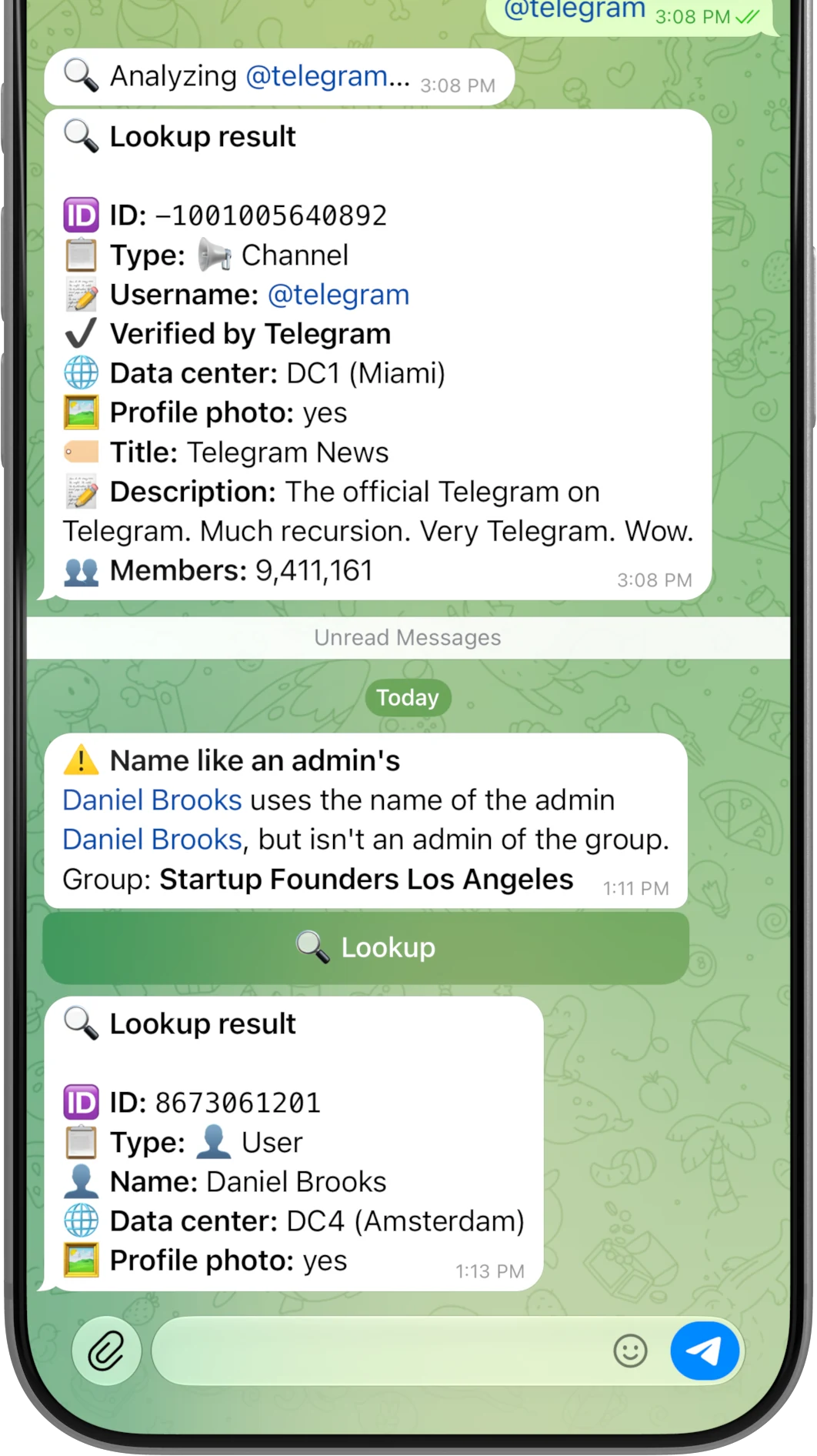
  • Clones of you and your adminsA name or username the same as yours, or almost: one changed letter or a character that looks the same is enough. Lookup alerts you, then you decide what to do.
  • Who changes nameWhen a member changes name or username, Lookup tells you what it was before and what it is now. So you never lose track of them.
  • The alert where you want itIn private, in the group to admins only, or in the group to everyone. You choose from /settings.

When you need to know who it is, Lookup is already on Telegram.

Add Lookup to Telegram and send it what you have. A free Doublegram account is all you need to see everything.

Free

$0

With a free Doublegram account

  • 5 full lookups a day, no card required
  • All the information, in private and from any chat
  • Your own ID in one tap, without using a lookup
Start free

Doublegram Premium

$9.99per month

Unlimited Lookup, and Premium in the other Doublegram bots too

  • Unlimited lookups
  • /lookup and alerts in your groups
  • 1,000 AI credits a month, Scribe and Security in full
  • Cancel anytime
Go Premium

Frequently asked questions

How do I look up a Telegram user, group or channel?
Open Doublegram Lookup in Telegram and send it what you have: a username, with or without @, a t.me link, an ID or a forwarded message. No commands needed: Lookup works out what it is on its own and tells you in seconds who's behind it. If you're in another chat, type @dglookbot followed by what you're looking for.How to search by username →
How do I find my Telegram ID?
Open Doublegram Lookup and tap My data: you'll find your ID, your username and your name. You need the free Doublegram account, and it doesn't count as a lookup. Tap the ID to copy it.
How do I find a Telegram group or channel chat ID?
Send Lookup the username or public link of the group or channel, or forward it a message from the channel. It replies with the full chat ID, the one starting with -100 that bots and APIs ask for, ready to copy.Telegram IDs explained →
Can I find a username from a Telegram ID?
Sometimes. Send the ID to Lookup: if Telegram lets it see who it is, you get the account with its username. With an ID alone, though, Telegram only shows accounts, groups and channels Lookup has already come across, so with people it often doesn't work. Then forward one of their messages to Lookup, or a post if it's a channel. A search that finds nothing doesn't count.How to search by ID →
Can Lookup see private groups and channels?
If you have the invite link, yes: Lookup tells you what the group or channel is called, how it describes itself, how many members it has and that it's private, without you joining. Without a link it can't find it, and it never reads the messages.Private groups and channels →
Can Lookup tell who sent a forwarded message?
Yes: forward it a message from that person and Lookup tells you who they are, with their ID and username. If they've hidden their account on forwarded messages, Telegram only shows the name, and Lookup tells you the account is hidden.How forward lookup works →
Can I look someone up without leaving the chat?
Yes. In any chat, type @dglookbot, then the username, ID or link you're looking for, and tap the row that appears. The answer arrives in that chat, so everyone in it can see it too. It counts as a normal lookup. @doublegram_lookup_bot works too, it's just longer to type.
Does Lookup work in groups?
Yes. Add it with «Add to a group» in the bot: it joins already as an admin, and if you have Doublegram Premium the group gets it from you (or another admin with Premium activates it from /settings). From then on, admins reply to a message with /lookup and find out who wrote it, even if they have no username, and only whoever asked sees the answer. From /settings you can also turn on alerts for admin clones and for people who change name. Lookups with /lookup don't count against yours.
Does Lookup bypass privacy settings?
No. Lookup only sees what Telegram makes public. If someone has hidden parts of their profile, you don't see those parts, and Lookup doesn't try to guess them.Users with privacy settings →
Does Lookup track past usernames or name history like SangMata?
No: Lookup doesn't keep anyone's name or username history, it shows you the profile as it is now. In your group, though, it can alert you when a member changes name or username, telling you what it was before and what it is now. To do that it only remembers the last name of whoever writes in the group, and deletes it when they leave.
Looking for userinfobot?
Lookup gives you your own ID too: with the free account, just tap My data. On top of that, you can send it anyone's username, link, ID or forwarded message and find out who they are. And in your group, reply to a message with /lookup to get the ID of whoever wrote it.
Is Lookup free?
Yes. Without an account you already see part of every result. With the free Doublegram account you see everything and get 5 lookups a day, reset at midnight UTC, in private and from any chat. With Premium, lookups are unlimited and you also get /lookup and alerts in your groups.Free access and Premium →


